Solitaire Pocket: Quick Play
- 4.5
- Rating
- 10.00K
- Installs
- Free
- Price
 Analysis by App-foxy
I spent time with Solitaire Pocket: Quick Play as a simple way to play Klondike solitaire on an Android device, and its appeal is easy to understand: it focuses on the familiar card game rather than trying to turn a quiet pastime into a complicated system. Developed by PlayMint, this free board game is aimed at anyone who wants a quick solo round, whether that means filling a few spare minutes or settling into a longer session.
My first impression was that the game is built around a straightforward promise. You open it, begin a hand, and concentrate on arranging cards. That simplicity matters in a genre crowded with solitaire apps that may add daily challenges, elaborate reward tracks, themed events, or layers of customization. Those extras can be enjoyable, but they can also get in the way when all I want is a clean Klondike experience.
The app has an average rating of 4.5 from around 129 ratings, with 10K+ installs. Those figures suggest that it has already found a modest audience, while still feeling like a relatively focused title rather than a huge, heavily established platform. It is rated for Everyone, which fits the accessible nature of traditional solitaire and makes it suitable for casual players across a broad age range.
You May Also Like

 Pandora - Music & Podcasts
Pandora’s Music Is Easy to Start, but Harder to Recover
Pandora’s strength is its low-effort path from a seed to a station. Its weak spot is how much confidence it asks you to place in connection, setup, and quiet recovery.

 8 Ball Pool
 Is Built on Rivalries, Rematches, and Routine
A close look at the rivalries, rematches, shared routines, and unanswered safety questions that turn a quick pool match into a persistent mobile community.

 Samsung Music
’s Quiet Strength Is Playing What You Already Own
Its reach comes less from spectacle than from dependable access to a personal library. That simplicity is both the app’s strongest retention engine and its ceiling.

 AccuWeather: Weather Radar
AccuWeather Review: A Quick, Clear Forecast for Everyday Decisions
For everyday plans, the best forecast is the one you can understand quickly. AccuWeather makes rain timing, radar, and local conditions easy to act on, with a few trade-offs.

 Hill Climb Racing
Why Hill Climb Racing Still Turns Crashes Into One More Run
A tiny car, a bumpy hill and one more upgrade: Hill Climb Racing keeps resurfacing because its simple chaos makes every near-miss feel personal.

 AliExpress - Shopping App
AliExpress Makes Global Shopping Feel Personal, but Shoppers Bear the Risk
AliExpress turns a global marketplace into a pocket-sized discovery engine. Its reach is useful, its shopping loop compelling, and its trade-offs easy to miss.
More From Our News Desk
View All News


How Solitaire Pocket feels in everyday play
I find the everyday appeal of Solitaire Pocket in how little it asks before a hand begins: familiar Klondike rules, a few deliberate choices, and a natural stopping point. In this section, I’ll look at when that compact rhythm works best and what I’d pay attention to on a real phone, so the next part can focus on the decisions that keep a round engaging.
Quick rounds work best when time is limited
The strongest use case is the small gap in a normal day. I can imagine opening it while waiting for an appointment, taking a short break from work, or sitting on a train without wanting to commit to a large game. Solitaire naturally divides into manageable hands, so the format works well when I need something mildly absorbing but not demanding.
The “quick play” idea is most convincing when I treat the game as a pocket activity rather than a long-term hobby. It does not need a story to remember, a team to manage, or a complicated objective to explain. I already know the basic rhythm of Klondike: expose hidden cards, build descending alternating-color sequences, and move cards toward the foundations in order. That familiarity reduces the time between opening the app and actually playing.
For a new player, the same simplicity can be reassuring. Solitaire is easy to recognize, but making good decisions still takes practice. A beginner can learn by watching how moving one card exposes another, then gradually understand why an apparently useful move may close off a more important option. I would recommend it to someone who wants a gentle introduction to card strategy without the pressure of competing against other people.
Speed is valuable because the game has little overhead
In my experience, the perceived speed of a solitaire app is less about dramatic animation and more about how quickly it lets me return to the decision in front of me. A card game feels slow when menus, interruptions, or unnecessary transitions take attention away from the layout. Solitaire Pocket: Quick Play benefits from its narrow purpose: the less there is between hands, the better the experience feels.
That does not mean every player will experience it identically. Performance depends on the Android device, the operating system, and whatever else is running at the same time. The listed minimum operating system is Android 7.0, so the app is positioned to work with a wide range of devices, including older phones that are not running the newest software. That is useful for people who keep a spare phone for travel or prefer not to replace a perfectly serviceable device.
There is an important trade-off here. Compatibility with older Android versions can make a game more approachable, but it also means I would not assume that every modern visual or convenience feature is present. If your priority is a highly animated, luxurious presentation, a more elaborate solitaire alternative may feel richer. If your priority is getting into a hand quickly, a focused design is usually the better fit.
What happens during longer sessions
A short round is the easy test. The more revealing question is what happens when I continue playing for several hands. Solitaire has a naturally repetitive structure, so small annoyances become more noticeable over time. Card readability, the ease of selecting a move, and the amount of effort needed to start another hand all matter more than they do in a single five-minute session.
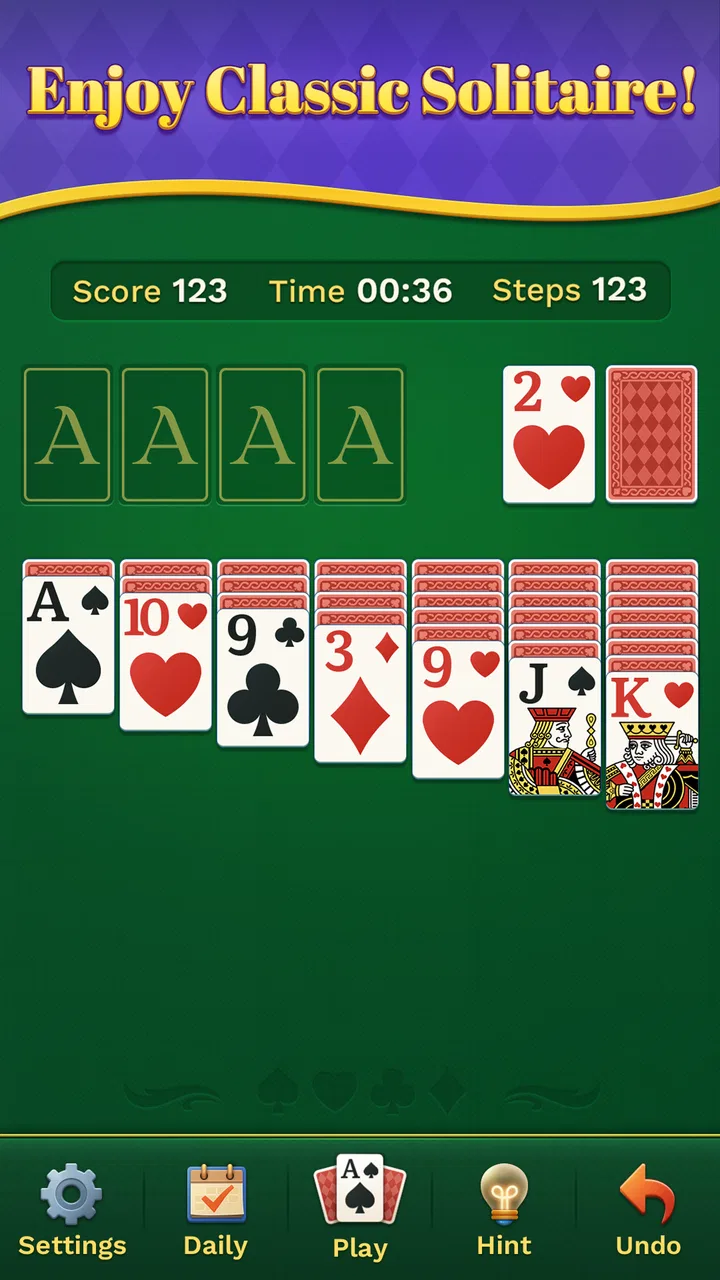
My advice is to use it in deliberate bursts at first. Play a few hands and notice whether the layout remains comfortable on your particular screen, especially if you use a compact phone. A board that looks clear on a large display can feel cramped when the cards are smaller. This is not a flaw unique to this title; it is a practical limitation of fitting seven tableau columns and several foundation areas into a narrow portrait screen.
Heavy use also changes how I judge resource demands. A game with simple card-based play should generally be easier on a device than a visually intense action title, but I would still avoid making assumptions about battery use or memory behavior without testing the exact phone. The sensible expectation is modest demand from the type of game it is, not a guarantee that every device will behave the same way.
Small decisions make the classic format worthwhile
The best part of Klondike is not speed alone. It is the tension between an immediately attractive move and a move that preserves future choices. I often find myself pausing before sending a card to a foundation because moving it too early can remove flexibility from the tableau. That kind of decision gives the game more depth than its quiet presentation suggests.
A useful habit is to look for hidden cards before making automatic-looking moves. Exposing a face-down card can be more valuable than building a foundation immediately, particularly when the exposed card may open a blocked column. Another practical tip is to compare all available tableau moves before touching the stock. Players who draw too quickly can miss a sequence that was already available on the board.
These habits are especially helpful for people who think solitaire is entirely random. Luck certainly affects a hand, but the order in which I uncover cards and preserve empty spaces can change the quality of my options. That gives Solitaire Pocket: Quick Play a useful middle ground: it is relaxing enough for casual play, yet thoughtful enough to reward attention.
Reliability matters more than spectacle
For a game like this, reliability means being able to return to a hand without unnecessary friction and having the core card experience remain predictable. I value that more than a long list of features. When I open a solitaire app, I do not want to spend my limited break figuring out a new economy or navigating a crowded event screen.
The current version is 1.0.16, and the game was released on March 6, 2026. That places it in a relatively early stage of its life, so I would approach it as a focused title that may continue to develop rather than as a mature solitaire ecosystem with years of accumulated options. The benefit is that the experience can feel uncluttered. The caution is that players looking for a deeply expanded feature set may prefer an older, more established alternative.
Recovery is another practical consideration. If I am interrupted by a call, a notification, or a change of task, the value of a short-play game depends on how easy it is to get back to the action. I would make a habit of finishing a move before switching away, particularly during a complicated sequence. That is good practice for any mobile card game, because interruptions can make it harder to remember which moves were still available.
I also recommend treating the app as a focused game rather than assuming it will replace every solitaire tool. Players who rely on detailed statistics, extensive history, specialized variants, or competitive comparisons should check whether those needs are met in actual use. Solitaire Pocket: Quick Play is most convincing when judged on its central activity: playing Klondike without a lot of surrounding noise.
Older devices and screen comfort
The Android 7.0 requirement gives the game a practical advantage for users with older hardware. Someone who has kept an older phone because it still handles calls, messaging, reading, and light entertainment may be able to add this game without needing a new device. That broad compatibility is particularly useful for a simple board game, where the main requirement is a clear, responsive card layout rather than advanced graphics.
Still, operating-system compatibility is not the same as guaranteed comfort. Screen size, touch sensitivity, and display scaling can affect how easily I select a card or distinguish overlapping columns. If a move requires precision, I prefer to tap deliberately instead of rushing through a sequence. On a small screen, using one hand may also become tiring during longer sessions, so a table or desk position can make the experience more comfortable.
Device age can influence recovery as well. Older phones may take longer to return to an app after another task has used memory, even when the game itself is lightweight. I would not blame the game automatically if a hand has to be reopened after a long interruption; mobile operating systems make their own decisions about background apps. For the smoothest routine, I would start a hand when I know I have a few uninterrupted minutes.
Who will enjoy it most
I think this game is a good match for traditional solitaire players who want a free, self-contained board game and do not need social competition. It is also suitable for people who prefer familiar rules, short sessions, and a calm pace. The Everyone age rating reinforces that broad accessibility, although younger players may still benefit from learning the basic rules with someone who already knows Klondike.
It is less suitable for someone who wants multiplayer matches, a large collection of card variants, or a strong sense of progression. A player who needs a constant stream of missions and unlockable content may find the classic format too restrained. Likewise, if you already use a favorite solitaire app with a polished statistics dashboard and a long record of personal results, switching may not offer enough practical benefit unless you specifically want a simpler alternative.
There is also a difference between “free” and “minimal.” The game costs nothing to download, which removes the financial barrier for trying it. But free does not automatically mean it will satisfy every preference. I would choose it because of the direct card-game focus, not because I expect a broad entertainment package around it.
A realistic routine for using the game
My preferred routine would be to keep it available for short breaks rather than treating it as a primary evening game. I might play one hand while waiting for food, stop after a win, and return later when I have another few minutes. That approach makes the repetitive nature feel intentional instead of asking the game to provide endless variety.
For a more thoughtful session, I would play without rushing the stock. First, I would scan the tableau for moves that reveal hidden cards or create an empty column. Then I would consider whether a foundation move improves the position or merely looks satisfying. Finally, I would use the stock with a plan, remembering which cards have already appeared. This workflow turns a familiar game into a small exercise in memory and prioritization.
Another useful approach is to use the game as a reset between demanding tasks. Because the rules are familiar, I do not need to spend mental energy learning a new system. At the same time, the choices are active enough to pull attention away from a stressful email or a long day. I would keep the sessions bounded, though; a quick game can easily become a longer distraction when I keep chasing one more hand.
How it compares with common alternatives
Compared with playing solitaire through a web browser, a dedicated app is more convenient for repeated short sessions because I do not need to find a page and wait for it to load each time. The trade-off is that a browser version may be easier to abandon without using storage space or adding another app to a phone. For someone who plays only once a month, the browser may be enough. For daily breaks, the dedicated format makes more sense.
Compared with feature-heavy solitaire apps, this title has a clearer identity. It is better for a player who dislikes clutter and wants to concentrate on Klondike. The alternative wins for users who enjoy achievements, daily goals, visual themes, or detailed records. Neither approach is universally superior; the right choice depends on whether the card layout or the surrounding reward system is what keeps you playing.
It also differs from physical cards in an obvious but meaningful way. A phone is always close at hand and does not require a table, while a physical deck offers a tactile experience and makes it easier to pause a layout without worrying about an interruption. Solitaire Pocket: Quick Play is the practical choice for portability, not a replacement for the feel of handling real cards.
My performance verdict
After weighing its purpose, compatibility, and likely use pattern, I see Solitaire Pocket: Quick Play as a sensible choice for uncomplicated Klondike sessions. Its strongest performance quality is perceived efficiency: the game is centered on the activity I opened it to play, rather than surrounding that activity with unnecessary complexity. That makes it easy to recommend to a friend who wants a quiet card game for spare moments.
I would keep expectations realistic on older or smaller devices. The Android 7.0 minimum makes the game accessible to a broad range of phones, but individual screen comfort and app recovery can still vary. If your device is crowded with background tasks, give the game a clean start and avoid judging the experience solely by what happens after a long interruption.
My final recommendation is conditional but positive. Choose it if you want a free, familiar board game from PlayMint, appreciate the traditional Klondike format, and prefer short sessions over a large feature catalogue. Skip it in favor of a more elaborate alternative if your enjoyment depends on multiplayer play, extensive progression, or advanced personal tracking. For everyone in between, the real strength is its focused, low-pressure way to turn a few spare minutes into a thoughtful card game.
FAQs for Solitaire Pocket: Quick Play
01What is Solitaire Pocket: Quick Play?
Solitaire Pocket: Quick Play is a mobile card game focused on fast, convenient solitaire sessions. It is designed for players who want to enjoy a familiar single-player card challenge without committing to a long gaming session. The interface is generally easy to understand, making it suitable for both casual players and people who already know classic solitaire rules. Before downloading, keep in mind that the overall experience may include advertisements or optional in-app purchases, depending on the platform and version available.
02How do you play Solitaire Pocket: Quick Play?
The game follows the basic principles of solitaire: you arrange cards in descending order while alternating colors, uncover hidden cards, and build each suit from Ace through King. Controls are adapted for touchscreens, so cards can usually be moved by tapping or dragging. The quick-play format makes it convenient for short breaks, although the difficulty can vary depending on the deal. New players should take a few rounds to become familiar with the available moves and scoring system.
03Can Solitaire Pocket: Quick Play be played offline?
Solitaire Pocket: Quick Play may be playable without a constant internet connection, which is useful when traveling, commuting, or trying to save mobile data. However, some features can still require connectivity, including advertisements, analytics, updates, cloud-related services, or promotional content. Availability may also differ between Android and iOS versions. It is best to launch the game once while connected, then test whether the main solitaire mode works properly in airplane mode before relying on it offline.
04Is Solitaire Pocket: Quick Play free to download?
The application is generally presented as a free download, allowing users to try the main solitaire experience without paying upfront. Free access may be supported by advertisements, and the game could offer optional purchases for removing ads, unlocking features, or obtaining additional benefits. Always check the store listing before installing because pricing, subscriptions, advertising policies, and available purchases can change. Parents should also review device purchase settings if children may use the app.
05Is Solitaire Pocket: Quick Play suitable for all ages?
Solitaire Pocket: Quick Play is usually appropriate for users who enjoy calm, uncomplicated card games, and its rules are simple enough for many age groups. The main considerations are not violent content or complex controls, but advertising, optional purchases, and the privacy permissions requested by the app. Younger players may need supervision, particularly if the game displays third-party ads or includes purchase options. Reviewing the current age rating and privacy information in the official store is recommended before downloading.
Pros
- Quick rounds are ideal for short breaks or casual sessions.
- Simple controls make the game accessible to players of all ages.
- Offline play lets you enjoy solitaire without a constant connection.
- Clean visuals keep the cards easy to read on smaller screens.
- Fast restarts make it easy to try another hand immediately.
Cons
- Random deals may occasionally feel repetitive over longer sessions.
- Some features may be limited unless optional purchases are made.
- Small cards can be harder to read on compact phone displays.
- Progression and rewards may feel shallow for dedicated players.
- Ads can interrupt the flow between games or during menu navigation.

Solitaire Pocket: Quick Play
Gallery